Showing posts with label etsy tips. Show all posts

Tuesday, April 19, 2011

2000 Sales!!!


Last Thursday I made my 2000th sale on Etsy! It has been a year and a half since starting Sleepy Robot 13 and opening my shop and I want to thank everyone who has helped my business grow over that time. Without all of you I couldn't do what I love for a living and that means the world to me!

Thursday, September 16, 2010

Etsy Selling Tip 6: Using Paypal to Process Payments at Craft Shows

I originally found this article on www.handmadenews.org/ This is something I have been doing for sometime at craft shows that have WiFi access. I feel this article explains it far better than I ever could. I usually take my laptop with me on the off chance that the show will have wifi and I can allow people to check out via Pay Pal. It is much simpler and affordable than buying a credit card machine/processing credit cards and it's safer. The following article explains how to allow customers to check via Pay Pal Using a "Donation" button. I myself have never used this method. At the conclusion of the article I will put in my 2 cents on how I usually have customers pay via Pay Pal at craft shows.

Via Handmadenews.org
If you have been looking into the options for processing payments at craft fairs you will have noticed that most require some sort of monthly financial commitment that seems a little pointless paying especially if you don't do a fair every month or you don't take many card payments.

However with mobile broadband for netbooks and smartphones it is now possible to take payments through paypal.

First set up a donate paypal button in your paypal account you can do this by going to merchant services and clicking on the link for the buy now buttons then clicking on the donate link in the left menu. Donate is best since you can enter the amount as needed rather than creating buttons for each price and having to use add to cart for customers that want to make multiple purchases.

You don't even have to host the donate button anywhere once it is created you will be able to click through to the page and bookmark that so you can get to it quickly. (if you are using a smartphone you may find it easier to temporarily host the button on a free site builder so you can click through to the link after setting it all up on your home computer.)

For blackberry users you will need to download the opera browser because the default browser automatically goes to the paypal mobile site and this feature isn't possible on that.

Now you should have your donation page bookmarked and all you will need to do when you have a person wanting to pay is go to the bookmarked page, enter the purchase amount (inclusive of any taxes) and put in the card details, if your customer is registered with paypal then they will be able to log in and pay that way if preferred.

Of course there are limits with the paypal system since they do not accept all cards and anyone that has already used their card three times with paypal will need to sign up for an account but you now have a simple and free (other than the cost of your phone/netbook) way to process most card payments. This works best for those outside the US since you will be able to have the payments in your own currency. However if the venue you sell on is in your own currency you can just process through your venue but the donate button makes things faster because you don't have all the purchase steps to jump through.


Sleepy Robot 13's 2 cents:

Ok so I use 1 of 2 methods to allow customers to check out via Pay Pal. The 1st is just using plane old Etsy. I will pull up Etsy on my laptop and if it is an item already for sale in my shop they are purchasing, I just remove the shipping charge and let the customer log into their Etsy account (If they have one) and check as normal. I like this method because it helps me keep track of sales and the customer is able to find me again later if they want to purchase something else (we all know business cards usually end up at the bottom of a purse or junk drawer).

The 2nd method I use is letting the customer check out directly via their Pay Pal account and clicking on the "Send money" tab. Now not all customers will be comfortable with this option because they are logging into their Pay Pal accounts from someone else's computer. For both methods of check out I recommend having cookies turned off on your computer so the customer's information is not saved. The upside to using this method is you avoid Etsy's transaction fees and you have a record of the sale for tax purposes.

Tuesday, September 14, 2010

856 Etsy Sales!

Today I reached 856 sales on Etsy and along with countless other sales offline it feels amazing! Next month on the 9th I will celebrate my one year anniversary of opening my Etsy shop. I am still amaze in less than a year how fair I've come. I definitely couldn't have done it without the advice of other amazing crafters, all of you who wrote about me on their blogs and having the guts to try things that others wouldn't think of, without knowing if they would be a success or I would fall flat on my face! Sleepy Robot 13 definitely put a hole in my wallet for a while, but before there can be feast there must be famine...or maybe I should just say it takes money to make money. I started Sleepy Robot 13 with 3 figurines (2 of which weren't even robots) and the hope that I could make a little money to pay my bills while I was out of work and today it's more than I could have ever hoped. My goal is to reach 1000 sales by my shops one year anniversary. 144 sales in 3 1/2 weeks, think I can do it?

Friday, July 9, 2010

Etsy Selling Tip 5:"Tag Your it!"

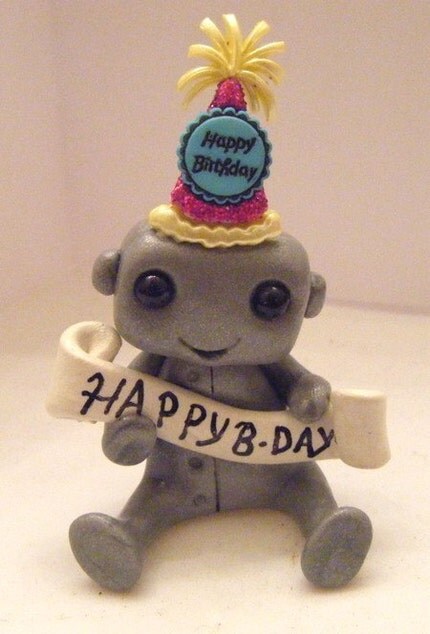
Tags! Tags are one of the smallest, but most important ways to get someone to find your items. There are so many tags that can be used to describe your unique item(s) on Etsy (as well as flickr.) Usually when tagging an item I first browse the suggested tags listed under the chosen category for my item. I post a lot in the Geekery category. My top 3 tags I select from the suggestions are: Robots (duh lol), Toys, and weird. After I have selected from the suggested tags I add my own. For example lets say I was adding tags to the item listed below, my "Happy Birthday Robot.


Tags I may include for this item would be Birthday, Gift, Silver, Cute, Fun, and Unique. I always recommend adding the main color of your item as a tag. You'd be amazed how many people just search by color. If your item is on of a kind (OOAK) add that as a tag! You should also put your shop name as a tag as well, It makes it easier for people to find your items via search engines like Google shopping.

Everyone has their own unique way to tag. The best thing you can do is look around at other established sellers and see what type of tags they are using on their items.

Friday, June 25, 2010

Crafty Advice Youtube Channel anyone? Send me your questions!

Hi guys sorry for the lack of updates lately. I've been busy preparing for craft shows and making wedding cake toppers. I hope to next month put together a post to show you all of the custom toppers I've made this summer in a special wedding segment. I've also been working on putting together a youtube channel where I can put up video containing crafting/small business advice. The main reason I wanted to start the channel was to answer all the questions you guys have been emailing me. I will still continue to post selling tips and advice here, but I figured that somethings make more since when you see them. As soon as the channel is finished I will post a link here, but in the mean time I would love it if you guys would submit questions for me to answer in my videos. Please send your questions to lisastarchild@yahoo.com. Also as soon as I get the software working correctly I plan on posting short animated web comics featuring many of my Sleepy robots. I'll keep you updated!

Sunday, May 30, 2010

Etsy Selling Tip 4: The Price Is Right!

I frequent a lot of craft forums and I see this question over and over again: "Do you think I am charging too much/too little for my items?" I think the best answer to this question is another question, "Would you pay that much for the item or a similar item?"

We all know that money is tight these days. When I price my items I always ask myself how much I would pay for a similar item from another seller if I were buying online or at a craft show (I'll talk a little more about craft show pricing later in this post.) Now this is just my personal opinion and it has worked for me. Never sell yourself (or your craft) short if you put a lot of time, effort and love into something you've created you should by all means get paid well for it, but remember to be realistic. Also take into consideration that most people buy handmade because they are looking for a unique item...without the heavy price tag of something mass produced.

What it really comes down to is you know your price is right if you'd pay it yourself. If you wouldn't pay the amount you are charging for a similar item, no matter how unique and well made it is, you are charging too much.

Now, how do you decide if your prices are too low? Ask yourself this, Are your making a reasonable profit over your supply cost? Can you cover your Etsy fees at the end of the month? (Assuming you haven't spent all of your money visiting other awesome Etsy shops lol!) If you answered no to these two questions, then your price is probably too low. If you are at this point don't be afraid to raise your price a little. The price of your item can reflect the quality of your item just as much as the photo. If a price is too low buyers may think that the quality is low as well.

Craft Show pricing

The most important thing to remember about a craft show is that it is a craft show not a flea market, therefore do not drop the price of your items to unreasonably low prices. I have been to shows where fellow Etsians are selling their crafts for half and sometimes less than half the cost they sell their items online for. I am all for giving a price break at a show, but once again do not sell yourself short. Knocking a few buck off mid-level and high ticket items is a great way to get people out to a show you are participating in. I post information about shows I am doing in my shop announcements and on my blog. I often let buyers know I will be discounting some of my items during the show as well as selling items not listed on Etsy. This not only brings potential buyers out to the show but also to your table/booth.

Now, how do you decide if you should keep your pricing during a craft show the same as in your Etsy show or slash the prices. This should be gaged on the show it'self. I say always start out the first 1-3 hours(depending upon the length of the show) as close to your original price as possible. As the day goes on base your pricing on the following:

Hows the crowd? Is it large, steady or very thin?
How many other vendors are there selling items similar to yours?
Do buyers really contemplate an item after learning the price or do they walk away immediately or shake their heads (I see this a lot from older buyers)

One thing I've learned is to stay firm on a price if a potential customer really ponders and it and comes back several times to look at it again or see if it's still there. This usually means 1) They may be a fellow vendor and need to make a few sales of their own before they can buy anything, they saw something at another table they liked and are trying to figure out which item they like best or if they can afford both and finally if you are going to drop your price. Remember it is not a flea market or a swap meet. Your not just cleaning out your garage and throwing the items on a table. You worked hard on your creations. Do not be discouraged if the person ultimately walks away. Their going to be the ones on the ride home kicking themselves because they didn't buy that item from you they really liked. On several occasions a few days after shows I have gotten orders/convos from people who saw one of my items at a show and didn't buy anything then, but when they got home decided they really liked it and should have bought it.

If the day has been slow and and the crowds haven't been great, you may want to drop your prices a little. Your goal should always first and foremost be to make back your table/booth fee and your supply cost, because everything after that is profit. Even if you don't make a profit at least you are not out any money and you got your name and your product out in the public. My 1st show I didn't even come close to breaking even, but several people saw my stuff and looked me up online.

Finally it's important to take into account the area of the show is in. Potential customers may not have as much disposable income to spend as those in other places in your city. Keep that in mind as you are pricing your items.


Wow! Sorry this one was so long. I probably started rambling there for a bit.

Etsy Selling Tip 3: Flick It!

UPDATE 5/31/2010:
I just wanted to clear up that I am in no way telling you to try to sell items through your Flickr site. I am just reminding you that it can be a way for more people to see your crafts and connect with artists you may not have found out about via Etsy alone. I do not think that you should blatantly try put "find me on Etsy" in your description or anything, but to remember to put links in your profile. Also you should put photos of yourself in your Flickr account. I think it is always great to get to see the person behind the craft.


As Etsy sellers, especially when we are first starting out we don't have a lot of money to spend on advertising. Therefore low cost and free advertising is very important! Over the next few entries I will discuss several forms of advertising that I use. Today I'd like to discuss Flickr. I think Flickr is one of the best free to low cost advertising opportunities available that a lot of Etsy sellers do not use to their advantages.

How to use Flickr to promote your shop/items:

1) Fill in your profile!
I find photos of awesome handmade items on Flickr often. The 1st thing I do is click on their profile to learn more, only to find it blank! Think of your Flickr account as an extension of your Etsy shop. As it is against Flick policy to link to your Etsy shop in the description and title of an image, it needs to be in your Flickr profile. You should also link to your personal site and blog if you have one.

2)Take a look around
Do searches for pictures of items relating to your craft. This can give you more ideas on making your items more photogenic, using color schemes, background props and placement. Searching also helps with finding new tags for your photos(for use on Flickr and Etsy.) I have found several new terms to tag my photos with that I never thought of (I will focus more on tags in a later post.) Descriptions are another great item to look at. A great description can really make your photo stand out and your item(s) seem more interesting.

3)Get Connected
Add fellow crafters on Flickr as contacts. This is a great way to keep track of users you may want to find again as well as creating a network of friends that may have tips and advice to offer.


4)Group Therapy (Possibly the most important)

Search and join groups pertaining to the items you make and the materials used. As the majority of my items are created using polymer clay, therefore I joined several polymer clay groups. Next was themed groups. One look at my Etsy shop and you will notice an overwhelming robot theme, so joining groups for fans of robots was the obvious next step. I try to add at least 1 or 2 photos 3 or more times a week to the groups I've joined with the most activity.

Below I've compiled a list of my favorite Flickr Groups


Toysaholic Anonymous (1,868 members)
~ Toys =D (JOIN Contest : MAY) (569 members)
Etsy Artists Rule: 1 Million Picture Pool (2,585 members)
Etsy.com love (11,599 members)
Craft Revolution (7,092 members)
I Made it Myself (19,666 members)
Kawaii D.I.Y (1,370 members)
Etsy - Look and Learn (6,389 members)
CraftGossip.com Crafty Reviews (967 members)

Cuteable (3,510 members)
CRAFT (10,244 members)

The Secret Life of Toys (13,625 members)
Character Design (5,908 members)
Artisan Jewelry on Etsy (1,992 members)

Monsters and other creatures (2,546 members)

polymer clay (1,981 members)
MONSTER CLAY (107 members)
Monster Art (25 members)

Etsy (1,655 members)

get crafty! (8,335 members)
Arts & crafts fairs & shows (1,890 members)
Kawaii Collectors (966 members)

Handmade Goodies! (6 members)
ROBOT (946 members)

Anything Polymer Clay (1,253 members)
Kawaii Crafters (172 members)

Toy Robots (515 members)

Handmade Kitschy Jewellery (419 members)

iheartcrafts: cute & colourful (171 members)

Etsy Packaging (1,696 members)

Wednesday, May 19, 2010

Etsy Selling Tip Part 2: Time Is Money

So I've been slacking lately on put up Etsy selling tips, so I'm going to make an effort to put up 1 or 2 a week for now on.

Selling tip: Time is money!

Now that there are SOooooo many sellers on Etsy when you post a new item it can be pushed from page 1 to page 10 in a matter of minutes in your given category. I noticed that there are better times of day than others to post a new item(s)and have them sit on the 1st or 2nd page of your given category longer. The longer your item(s) are visible on the top pages the more people will see your item. Most Etsy customers will usually on browse through the first 5-7 pages of a category before moving on, therefore it is crucial to stay in that page range as long as possible. I post a lot in the "Geekery" category. I have found that posting new items or re-listing items is best done between 11am and 1pm. I'm not exactly sure why posting thins out during these hours. The 2nd best time to post or re-list is 8:00pm-9:30pm. This makes sure you get all those night owls who have just hopped on etsy after a long day at work/school and are winding done for the evening. When I post/re-list during the 8:00 hour 7 times out of 10 I'll wake up to an over night order placed. Maybe not for the item listed, but it did draw the customer to visit the rest of my shop.

Don't get discouraged if no one buys your newly listed or re-listed item right away, even if it sits in the 1st 5 pages for an hour. The more people that see your item the more people who will probably mark it as a favorite. You have to remember that many customers on Etsy don't have a lot of free cash. They may really like your item but they have to wait for a pay day to roll around to purchase it. So keep in mind Favorites=Future Sales.

Wednesday, February 17, 2010

Sleepy Robot 13 on G4TV


So it was brought to my attention today by sakiwaki that you could see my Super hero robot for a brief second during an episode of "Attack Of The Show" which airs on cable channel G4Tv. Unfortunately I haven't had cable in 3 years, so I missed it ):

G4TV did an entire segment on Etsy (well mostly about the etsy shop "thechopshopstore")None the less it's awesome that one of my items made it's way onto tv even if it was only for a split second. G4 has since posted the segment on their website. You can view the video below:


Direct link: http://g4tv.com/attackoftheshow/exclusives/69800/threads-etsycom.html

Monday, February 15, 2010

UpStage Artisan Alley Pics


I thought I'd share some photos of my booth at the Upstage Artisan Alley show this past weekend. For it's first year it was a great show for a great cause. If anyone has the chance they should definitely check it out next year. This is actually a smaller set up for me. I decided not to take as much jewelry with me and I usually have a second smaller table of one of a kind figurines. I also had a backdrop to put up but there wasn't enough room for it. I was a little bummed because I ordered a new vinyl banner for my booth but it didn't arrive in time. i ended up making one by hand out of poster board.

Sunday, January 24, 2010

Sprucing Up Booth

So I've only done a few craft/art shows so far and I haven't really been too pleased with how my booth has looked. Over the last few weeks I have purchased a few things to make my booth stand out and not look so cluttered. I usually take a lot of stuff to shows, my figurines and jewelry.


I didn't have a lot of cash to spend so I tried to find some cheapy alternatives. Hopefully some of my ideas will help others trying to spruce up their booths!

1)Backdrop- So I got this idea from going to conventions where many of the booths had colorful backdrops that stood out in the crowd of mostly black. I figured I could use this during shows where I am in a space against a wall. Backdrops can be very pricey, so I bought bed sheets... that's right I said bed sheets! I bought these on ebay for $17.99. They are "Morgan's Kids" twin sheets. They are very bright and have an awesome tattoo influenced pattern screened on them. Their light weight and can be thrown up quickly (If you have some help) with a few tacks.


2)Display stands- This one is really cool. I wanted a way to display a few of the different variations of my "Bad Brian" figures. I was able to find a solar powered rotating display stand for under $12 on ebay. Doesn't need batteries or electricity which is great for outdoor shows! Even though it is solar powered it works indoors under regular light bulbs. I was actually able to but 2 mini spotlights at a local dollar store to attach to the sides of the display to keep it turning.


3)Risers- I learned when looking for a display stand, you don't always have to look for a display stand...did that make any sense? I was able to search around on the web and found nail polish racks that are perfect for displaying all of my robots. It was under $20 and holds almost 35 of my figures. It is made out of thick plastic.


I did buy one actual table riser. It was about $25 on ebay and it is made of cardboard. I bought a card board on because it was light weight, breaks down easily and lays flat. Eventually I plan to start doing some shows out of state an this would be easy to ship if necessary. It is very sturdy and the seller also had available cloth slip covers that go over the riser to make it looks more professional. I tried making one of these myself once and it fell apart by my 2nd show...


I have a show coming up soon so hopefully I can post pics of the new booth layout!

Thursday, January 7, 2010

Selling Tip 1: Business Cards That Stand Out!

Have you ever been at a craft show and every vendor there has business cards sitting at their booth for customers to pick up? Business cards are very important in the craft world.I have had many customers visit my booth at a show and not buy anything, but they take my card and purchase something days later from my etsy shop. You have to think if there are 100 vendors at a show customers are going to take cards from at least 20% or more of them, but when they get home they will probably only look 5% or less of them up online. The majority of cards people pick up at shows are lost or discarded. Due to this you have to make your card stand out!

When I was just starting out I booked a show at the last minute. I didn't have any business cards at all the day before the show. I was able to come up with a quick and very affordable solution. I went to my local craft store and bought 20 sheets for card stock for $.15 each. at home on my computer using photofiltre (a free photo editing program that can be downloaded safely from download.com) to type up my important info (ie. name of your business, your name,what you sell, your web address and email address.) I then added some fun clip art and then copied and pasted the design over and over again. I was able to get 9 cards onto 1 page.


After my design was printed I then cut the individual cards out using a pair of pinking shears. This created a cool zig zag pattern along the edges of the cards.

This is sorta how my cards looked when I was done:


Whats cool about this is your card stands out from all those other cards people picked out because it is different. When someone puts their hand in their pocket they feel something uneven and immediately pull it out to figure out what it is. They'll take one look at your card and remember the awesome booth they got it from!

If you don't want to spend the time making your own cards, you can try vistaprint.com or overnightprints.com, each offers 250 basic business cards for free, all you pay is S&H. I have order some of these myself as fill ins if I run out of my handmade cards.

So for $3 and a little bit of work I was able to make 180 business cards.

A Few More Affordable Tips Regarding Business Cards:


-If you need business card holders for your table try a dollar store. They some times carry business card holders. If they don't they carry small picture easels that work just as well and they are very decorative (This is what I use)

- You should carry business cards with you at all times. Nothing looks more unprofessional than pulling a wrinkled, crumpled business card from your pocket. You can get affordable simple business card holder for less than $3 on ebay or a little more if you want a cool design. It keeps your cards organized and it looks very sleek and professional!

Stay tuned for more tips coming soon and tell all your friends lol!